
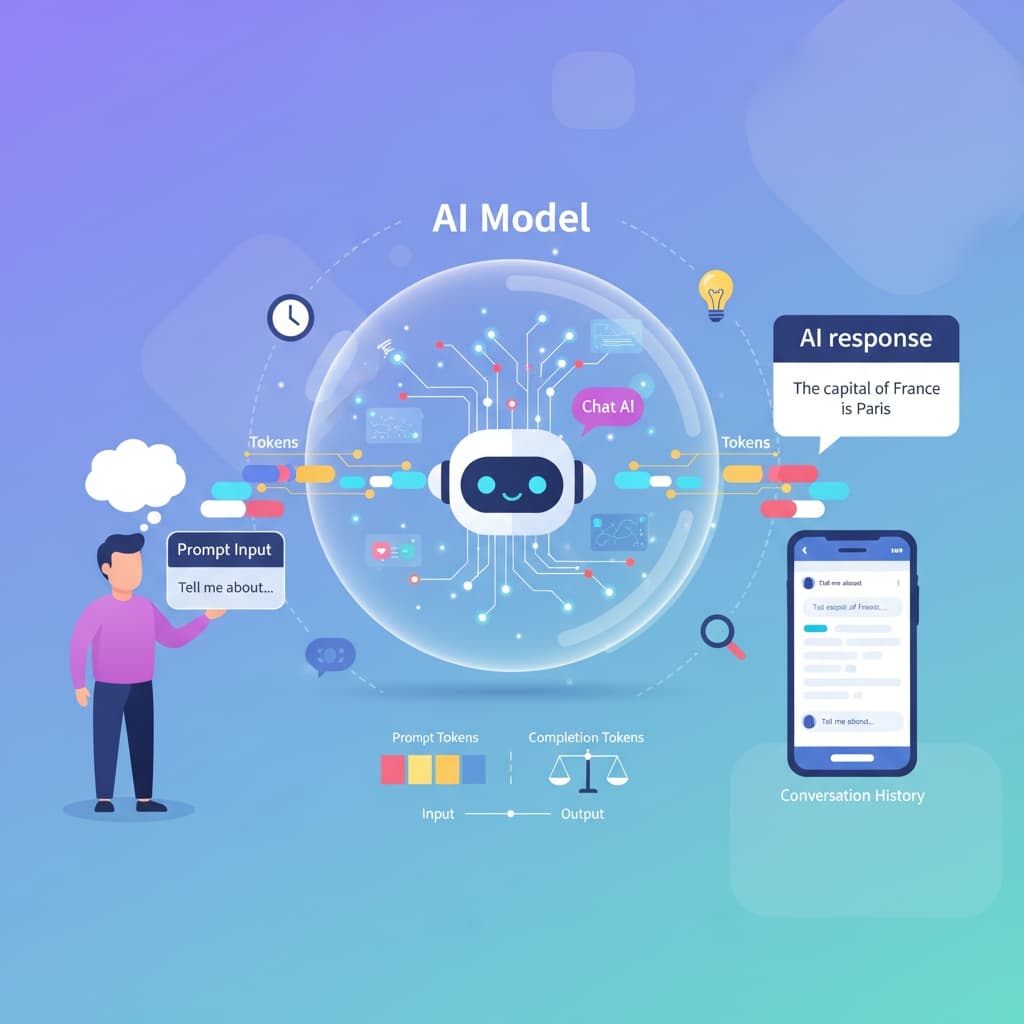
Collection of basic Chat AI concepts
First, I have gathered the fundamental concepts of chat-based AI that are necessary for understanding.
Collection of Basic Chat AI Concepts
1. Prompt
The text instruction or question given by the user to the AI, for example: "Write a short story about the first cat who traveled into space." 😀
2. Prompting
The user’s activity of formulating their request to the AI. Some people are good at prompting and get better results, while others are less so. This is slowly becoming a profession: those who can prompt better and extract better data may even get jobs from this, and there are already courses available.
3. Completion / Output
The response generated by the AI based on the prompt. Also called output or answer.
3. Token
AI does not count in words, but in tokens. A token is the smallest unit of text into which the system breaks the input before processing, so it is not exactly the same as a word or character. A token can be a whole word, syllable, punctuation mark, or even a part of a word. For example, "table" is one token. "Tables" can be split into multiple tokens ("table", "s"). In English, common short words such as "the" or "cat" count as one token, but longer words may be divided into several. The model works on each token: it predicts what the next token should be. This is the basis of text generation.
Paid providers, such as OpenAI or Anthropic, either charge based on the prompt or use token-based pricing. So you do not pay for letters or words, but for tokens. They can also combine the prompt/token dual system. Generally, if you work through an API call rather than through their interface (for example, communicating via an API integrated into programming software), pricing is usually token-based.
rnrn
Unfortunately, this can still be very expensive today. For example, if you are a developer and are not satisfied with the free OpenAI, but need the advanced, paid OpenAI, or work with Claude Sonnet, even 10–15 prompt tokens can cost 1–2 thousand HUF, and your expected data or software may not even be ready. In such cases, it is often more cost-effective not to pay directly to ChatGPT or Anthropic for the API, but to access these API calls through GitHub or WindSurf, which is much cheaper, but about this more info later on my blog.
4. Context (context window)
The amount of text (prompt + previous messages + AI responses) that the model can take into account at once. When the context is full, older parts are "forgotten" by the system. This is still one of the most frustrating limitations. Sometimes I even call it "2-bit memory" for the AI...
5. Model
Different versions of AI with varying capabilities and limitations, such as GPT-5, Claude Sonnet 4, Grok Code, Gemini, and many others today.
6. Training data
The text dataset on which the AI was trained. Most AI also learns from you when you use it. It cannot personally identify you, but it learns continuously from the "crowd," even if you delete your history. Knowledge varies by model; for example, GPT-4 was trained up to April 2023.
7. Fine-tuning
Further training of the model with specific data. Companies usually apply this for internal tasks. For example, a customer service chatbot is fine-tuned on the company’s own data.
9. Temperature
A parameter that affects the creativity of the response. Low values, e.g., 0.2, produce accurate but “dry” answers. High values, e.g., 0.8, produce more creative and varied text. Generally, the higher the value, the more the model "thinks," but in my experience, it doesn’t get significantly smarter with more thinking.
12. Hallucination
When the AI "invents" something that is not true but seems correct. Typically a source-free, “smart-sounding” statement. It often tries to extract information from you, so the way you phrase your prompt matters. Never include half an answer in your question, because the AI will notice. Unfortunately, hallucinations are still very common, and one of the major risks of AI. Always verify the accuracy of the information yourself.
13. Chain of Thought (hidden reasoning)
The model’s internal logical “thoughts” or monologue before generating a response. For example: "The user asked me to do "XY"..., now I’m looking for related data. I found some, but it’s not correct, so I’ll look for something else..."
Users could not see this in the past, but today it can be enabled in some models. It is quite impressive and a little scary, somewhat like in the Terminator movies when the robot’s thinking is displayed on the screen. 😁 ⚙️
15. Guardrails / Moderation
Safety layers that prevent harmful, dangerous, or rule-breaking outputs.


Facebook community
Follow us on Facebook for the latest posts!
📘 Facebook